Is the Basilisk V2 Still Good in 2026? Long-Term Review
I remember the day I unboxed the Basilisk V2. It was a time when the gaming mouse market was shifting aggressively toward "ultra-lightweight" hives—those honeycombed shells that felt like they might crush if you gripped them too hard. I’ve always been a bit of a contrarian when it comes to peripherals. I like a mouse with some substance, something that feels like a tool rather than a toy. After years of daily use, spanning across three different desk setups and countless hours of both competitive gaming and high-intensity spreadsheet management, I find myself sitting here in 2026 still clicking away on this same piece of hardware. It’s rare for an electronic device to survive this long in my rotation without being replaced by the "next big thing," so I felt it was finally time to document exactly why this mouse has stayed on my pad while others have ended up in the drawer of forgotten tech.
The Ergonomics of Longevity
When I first rested my hand on the Basilisk V2, I noticed the thumb rest immediately. In my experience, thumb rests are a polarizing feature; they either provide a comfortable "cockpit" feel or they get in the way of your lifting technique. For my grip style, which is a hybrid between a palm and a relaxed claw, the flared-out left side of this mouse felt like it was custom-molded for my hand. Unlike the newer, more symmetrical shapes that have dominated the market recently, the Basilisk V2 embraces its right-handed bias with zero apologies. After testing for several months initially, I found that my pinky finger didn't drag on the mousepad as much as it did with smaller, more nimble mice. This might seem like a small detail, but when you are at your desk for ten hours a day, those minor friction points add up to significant hand fatigue.
I was surprised by how much I appreciated the texture of the side grips. Many mice use a rubber coating that begins to peel or turn into a sticky, gummy mess after a year of contact with skin oils. I noticed that Razer used an injection-molded rubber texture here. In 2026, while there is some visible smoothing on the areas where my thumb sits most heavily, the grip is still functional. It hasn't "melted" like some of the older mice I’ve owned. The high arch of the mouse supports the center of my palm, which I’ve found reduces the strain on my wrist during long sessions. If you have larger hands like I do, you’ll understand the struggle of trying to use a tiny mobile or "competitive" mouse; the Basilisk V2 feels like it was built for adults who actually use their hardware for work as much as play.
Performance and Precision in the Modern Era
One thing that bothered me when I first bought this was the cable. Coming from a wireless setup, switching back to a wired connection felt like a step backward. However, Razer’s "Speedflex" cable is remarkably pliable. Even now, I barely notice it’s there, especially when I use it with a simple mouse bungee. The reason I’ve stuck with the wire is simple: reliability. I’ve never had to worry about a battery dying in the middle of a raid, and I don't have to deal with the inevitable degradation of lithium-ion cells that plagues wireless mice after four or five years. What I found was that the Focus+ 20K Optical Sensor is still more than enough for current standards. Even in 2026, where we see sensors pushing 30K or 40K DPI, does it actually matter? In my experience, no. I play at 800 DPI, and the tracking purity on the V2 is indistinguishable from the most modern sensors I’ve tried.
The clicks are another area where this mouse shows its age in a good way. It uses optical mouse switches, which I initially thought was just marketing fluff. However, after millions of clicks, I haven't experienced a single double-click issue. Anyone who used gaming mice in the late 2010s remembers the "double-clicking plague" that affected mechanical switches. I’ve seen countless friends toss their expensive mice because a single click started registering as two. With the Basilisk V2, the infrared light beam execution means there is no mechanical contact to wear out in the same way. The tactile feedback is a bit "mushier" than a crisp mechanical click—I noticed that immediately—but the trade-off for longevity is a bargain I would make every single time.
The Complexity of the Scroll Wheel
Perhaps my favorite feature, and the one that makes it hardest to switch to another mouse, is the adjustable scroll wheel resistance. On the bottom of the mouse, there is a small dial. I can turn it to make the scroll wheel completely smooth or incredibly tactile with heavy "notches." What I found was that I fluctuate between these settings constantly. When I’m editing a long document or scrolling through lines of code, I prefer a looser tension. When I’m gaming and need to reliably switch weapons without over-scrolling, I dial that tension up. It’s a physical customization that I really wish more manufacturers would adopt. Most mice give you one or the other; the Basilisk V2 gives you the spectrum.
I must mention a specific disappointment, though. The "clutch" button—the little paddle on the thumb side—is a great idea in theory, but in practice, I found it a bit awkward to reach. I have to shift my grip slightly forward to hit it comfortably. I eventually replaced the long paddle with the shorter one included in the box, and I mostly use it as a "push-to-talk" button for Discord. While it's marketed as a DPI-shifter for "sniping," I've found it much more useful for utility functions. One thing a real owner would notice is that the paddle can become slightly loose over time. It hasn't fallen off, but there is a tiny bit of "play" or wiggle in it now that wasn't there during the first six months of use.
Shop the latest Electronics picks on Amazon.
Shop Amazon →Long-Term Durability Findings
After testing for several years, the most obvious sign of wear is the PTFE feet. The "skates" on the bottom of the mouse are high-quality, but gravity and friction always win. I’ve had to replace the feet once in four years to keep the glide feeling smooth. If you are buying one of these second-hand or keeping your old one going into 2026, I highly recommend getting a fresh set of skates; it makes the mouse feel brand new. The shell itself has held up remarkably well. There are no creaks when I squeeze the sides, and the primary buttons haven't developed any side-to-side wobble, which is a common failure point for mice with split-trigger designs.
One thing that bothered me over time was the software requirement. Razer Synapse is significantly more bloated now than it was when this mouse launched. If you want to keep your custom lighting profiles and button rebinds, you generally have to keep the software running. I found that I preferred saving my main profile to the mouse's on-board memory and then disabling the software entirely. The Basilisk V2 can store up to five profiles, which has been plenty for my needs. It’s a "set it and forget it" solution that circumvents the annoyance of modern peripheral software suites.
Pros and Cons
- Unrivaled Ergonomics: The thumb rest and right-handed slope remain some of the most comfortable designs for long-term daily use.
- Optical Reliability: The switches are virtually immune to the dreaded double-clicking issue, ensuring the mouse lasts for years rather than months.
- Customizable Scroll: The ability to physically adjust scroll wheel tension is a game-changer for switching between productivity and gaming.
- On-Board Memory: Being able to save profiles directly to the hardware allows you to avoid using bloated software on a daily basis.
- Weight Balance: At 92 grams, it strikes a great balance for those who find "ultra-light" mice too flighty but "brick" mice too sluggish.
- Wired Limitations: In 2026, a permanent cable can feel restrictive compared to modern low-latency wireless options.
- Side Grip Wear: While durable, the textured rubber will eventually smooth out in high-friction areas after several thousand hours of use.
- Button Placement: The thumb paddle can be a bit of a stretch for those with smaller hands or specific grip styles.
Technical Comparison: Basilisk V2 vs. Successors
In my experience, comparing the V2 to what came after is essential because it helps justify why you might choose an older "wired" model over the newer iterations. Here is how it stacks up against the broader Basilisk family tree as we see it today in 2026.
| Feature | Basilisk V2 | Basilisk V3 | Basilisk V3 Pro (2026 Context) |
|---|---|---|---|
| Connection | Wired (Speedflex) | Wired (Speedflex) | Wireless / USB-C |
| Weight | 92g | 101g | ~112g (with puck) |
| Scroll Wheel | Manual Tension Dial | Electronic "Smart-Reel" | Electronic / Hyperscroll |
| RGB Zones | 2 (Wheel + Logo) | 11 (Underglow) | 13 (Multi-zone) |
| Price Point | Budget / Used | Mid-Range | Premium |
What I noticed from this comparison is that the V2 is actually the lightest in the specialized "Basilisk" ergonomic line. As Razer added more RGB and electronic scroll wheel mechanisms in the V3 and Pro versions, the weight started to creep up. For me, 92g is a sweet spot. It has enough mass to feel stable when I’m trying to make precise anatomical clicks in a photo editor, but it doesn't feel like a heavy weight dragging across my desk during a fast-paced shooter.
The 2026 Buying Guide: Should You Still Get One?
If you are looking at the Basilisk V2 today, you are likely finding it as a refurbished unit, a deep-discounted clearance item, or perhaps you’ve found one hidden in its original box in a local tech shop. In 2026, the electronics market is flooded with cheap, "disposable" gaming mice that look the part but fail within a year. The Basilisk V2 belongs to a different era—one where "pro" level ergonomics were being refined for the masses without the need for $150 price tags.
I would recommend this mouse specifically for three types of people. First, the student or office worker who wants a "productive" mouse that won't look out of place but offers the high-end sensor and buttons of a gaming peripheral. Second, the gamer on a budget who values durability over "wireless hype." If you want a mouse that will last through four years of college without breaking your bank account, this is it. Third, users with larger hands who find the current trend of tiny, symmetrical mice uncomfortable. In my experience, there is no substitute for a design that actually fills your palm.
Shop the latest Electronics picks on Amazon.
Browse Now →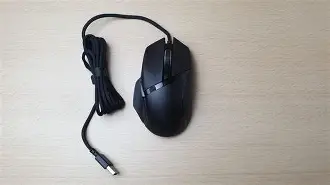
One thing to look out for if you are buying used is the condition of the scroll wheel dial on the bottom. I’ve noticed that if the mouse was stored in a dusty environment, that dial can become gritty and hard to turn. It’s a specialized part that is difficult to clean without opening the mouse. Always check that the scroll wheel still has a distinct "click" when the tension is turned up; if it feels loose even at the highest setting, the internal spring mechanism might be worn out.
Personal Disappointments and Quirks
I want to be authentic here: it wasn't all perfect. After using this for several years, there is one thing that bothered me more than anything else: the "matte" finish on the primary buttons. After about 18 months, the plastic where my fingers rest became shiny. It’s a purely aesthetic issue, but it makes the mouse look older than it actually is. I also noticed that the gap between the primary buttons and the shell is a magnet for dust and hair. I have to use a toothpick or compressed air once a month to keep the internals clear. If you aren't diligent about cleaning your desk, the Basilisk V2 will eventually start to look a little grimy because of its many aggressive angles and crevices.
Another finding from my long-term testing is that the RGB lighting can occasionally become "de-synced" if you aren't using the software. Sometimes the wheel will be one color while the logo is another, even though I have them set to a static white. It's a minor firmware quirk, but for someone who likes a clean, uniform desk aesthetic, it can be a persistent annoyance. I eventually just turned the lighting off entirely, which actually helps the mouse maintain its professional look when I have clients in my office.
Conclusion
In 2026, we are surrounded by tech that feels increasingly temporary. Phones are replaced every two years, and many peripherals are designed to be "upgraded" as soon as a new sensor or lighting gimmick appears. After testing the Basilisk V2 for what feels like a lifetime in tech years, I’ve come to appreciate its "old school" approach to quality. It doesn't have the flashiest underglow or the lightest honeycomb shell, but it has a shape that doesn't hurt my hand and switches that refuse to fail.
What I found was that the core pillars of good design—ergonomics, switch reliability, and user-adjustable hardware—simply don't expire. If you find one of these, or if you still have one on your desk, don't feel like you’re missing out on the 2026 flagship models. The Basilisk V2 remains a remarkably competent, comfortable, and reliable tool. In an industry that constantly tells us we need more, sometimes the most satisfying experience comes from a piece of gear that simply does its job, year after year, without complaint. In my experience, the Basilisk V2 isn't just "still good" in 2026; it remains one of the best ergonomic values ever produced in the electronics category.